Check Popeyes Gift Card Balance: Complete 2025 Guide
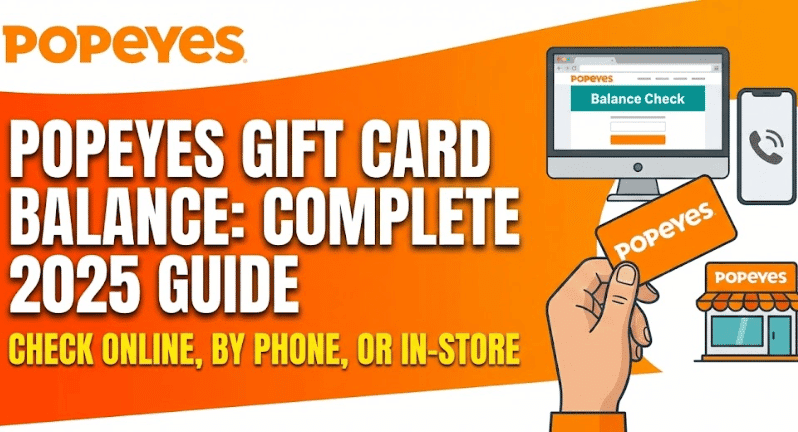
You can check your Popeyes gift card balance three ways: online at popeyes.com/gift-cards or the balance check portal, by calling 1-877-767-3937 (or 1-888-999-2117), or by asking a cashier at any participating Popeyes restaurant. You’ll need your 16-digit card number and PIN for online or phone checks.
How to Check Popeyes Gift Card Balance
Method 1: Check Balance Online
The fastest way to check your Popeyes gift card balance is through their official website.
Steps to check online:
- Visit popeyes.com/gift-cards
- Scroll down and click “Check Your Balance”
- Enter your 16-digit gift card number
- Enter your PIN (typically 4-8 digits)
- Complete the CAPTCHA verification
- View your current balance instantly
What you’ll need:
- Gift card number (16 digits on front of card)
- PIN or security code (on back of card, usually under scratch-off panel)
- Active internet connection
Method 2: Check Balance by Phone
If you prefer speaking with someone or don’t have internet access, call Popeyes customer service.
Phone numbers:
- Primary: 1-877-767-3937
- Alternative: 1-888-999-2117
What to expect:
- Automated system will prompt you for card details
- Have your 16-digit card number ready
- May need to provide PIN or security code
- Balance provided immediately
- Customer service hours: Typically 24/7 automated system
Method 3: Check Balance In-Store
Visit any participating Popeyes location to check your balance in person.
Steps:
- Bring your gift card to any Popeyes restaurant
- Ask the cashier to check your balance
- Provide your physical card
- Balance will display on their register
- No purchase required
Advantages of in-store checking:
- No need to remember PIN
- Cashier can help with card issues
- Immediate assistance if card isn’t working
- Can check multiple cards at once
Where to Buy Popeyes Gift Cards
Physical Gift Cards
In-Store Purchase:
- Available at any participating Popeyes location
- Purchase at the counter or drive-thru
- Denominations: $10 to $100 (varies by location)
- Instant activation and loading
Retail Stores: Major retailers that sell Popeyes gift cards include:
- Walmart
- Target
- Kroger
- CVS
- Walgreens
- Sam’s Club
- Costco
- Amazon (physical cards shipped)
Digital Gift Cards
Online Purchase Options:
- Popeyes official website (popeyes.com/gift-cards)
- Amazon (email delivery)
- Giftly
- Giftcards.com
- Kroger Gift Cards
Digital card benefits:
- Instant email delivery
- No shipping fees
- Perfect for last-minute gifts
- Can be sent directly to recipient
- Custom amount selection ($5-$500)
How to Use Your Popeyes Gift Card
Using In-Restaurant
At the counter or drive-thru:
- Order your meal
- Inform cashier you’re paying with gift card
- Hand over your physical card or provide card number
- Cashier will swipe/scan the card
- Remaining balance stays on card
- Pay difference with another method if needed
Using on Popeyes App
Mobile app orders:
- Download Popeyes app (iOS/Android)
- Create account or sign in
- Browse menu and add items
- Proceed to checkout
- Select “Gift Card” as payment method
- Enter 16-digit card number
- Enter PIN/security code
- Confirm order
App limitations:
- Not all app versions support gift cards directly
- If unavailable, order for pickup and pay in-store with gift card
- Check current app features before ordering
Using for Online Orders
Website ordering:
- Visit Popeyes.com
- Start your order
- Select location and items
- At checkout, choose gift card payment
- Enter card details
- Complete order
Note: Online gift card acceptance varies by location and ordering platform. Verify availability before placing order.
Can You Reload Popeyes Gift Cards?
Conflicting information exists about reloadability:
Some official sources (Amazon listings) state “RELOAD AT ANY PARTICIPATING POPEYES RESTAURANT”, while other sources indicate Popeyes gift cards are not reloadable.
Current understanding:
- Most Popeyes gift cards are not reloadable through official channels
- Some individual locations may reload physical cards at cashier discretion
- Once balance is depleted, you typically need a new card
- Reloadability may vary by franchise location
To confirm for your card:
- Check the back of your gift card for reload information
- Ask your local Popeyes restaurant
- Call customer service at 1-877-767-3937
Alternatives for regular users:
- Join Popeyes Rewards program (earn points on purchases)
- Save payment info in Popeyes app for convenience
- Purchase multiple gift cards during promotional periods
- Use prepaid debit cards for budgeting purposes
Gift Card Denominations & Pricing
Popeyes gift cards are available in various denominations:
| Amount | Where Available |
|---|---|
| $5 | Select retailers |
| $10 | Most retailers, Popeyes locations |
| $15 | Most retailers |
| $25 | All sources |
| $50 | All sources |
| $100 | All sources |
| Custom ($5-$500) | Online digital cards |
No additional fees:
- No activation fees
- No maintenance fees
- No expiration dates (funds don’t expire)
- Full face value available to spend
Using Popeyes Gift Cards for Delivery
Delivery platform compatibility:
Direct Popeyes ordering:
- ✓ Popeyes app: Yes (where supported)
- ✓ Popeyes.com: Yes (where supported)
Third-party delivery apps:
- ✗ DoorDash: Generally not accepted
- ✗ Uber Eats: Generally not accepted
- ✗ Grubhub: Generally not accepted
Workaround for delivery:
- Order pickup through Popeyes app using gift card
- Use your own transportation or arrange separate delivery
- Order in-store with gift card for takeout
Third-party platforms typically don’t integrate with restaurant-specific gift cards. Use credit/debit cards on delivery apps instead.
Gift Card Terms & Conditions
Important details:
Validity:
- Valid only at participating U.S. Popeyes locations
- May not work at international Popeyes restaurants
- Check with specific franchise locations for acceptance
Expiration:
- Funds typically do not expire
- Some promotional or bonus cards may have expiration dates
- Check card terms for specific details
Lost or Stolen Cards:
- Popeyes typically does not replace lost or stolen cards
- Cards are treated like cash
- Keep your receipt and record card number separately
- No balance recovery without proof of purchase
Non-transferable:
- Cannot be redeemed for cash (except where required by law)
- Cannot be returned or exchanged
- No refunds on gift card purchases (check state laws)
Multiple Cards:
- Can use multiple gift cards in single transaction
- Split payments allowed (gift card + credit/debit)
- No limit on number of cards per purchase
Troubleshooting Common Issues
Card Not Working
Possible reasons:
- Card not yet activated (check receipt)
- Entered wrong card number or PIN
- Balance depleted
- Technical issue with card
Solutions:
- Verify card number and PIN accuracy
- Check balance using methods above
- Wait 24-48 hours after purchase for activation
- Contact customer service: 1-877-767-3937
- Have purchase receipt ready
Balance Not Updating
Why this happens:
- Recent transactions may take time to process
- System processing delays
- Multiple pending transactions
What to do:
- Wait 24-48 hours and check again
- Keep receipts from recent purchases
- Contact customer service if balance doesn’t update after 48 hours
Wrong Email for eGift
If you sent a digital gift card to wrong email address:
- Contact Popeyes customer service immediately
- Provide transaction details and correct email
- Have purchase confirmation ready
- Act quickly before recipient accesses card
Gift Card Promotions & Deals
Where to find discounts:
Seasonal Promotions:
- Black Friday bonus cards with purchase
- Christmas holiday bonus offers
- Mother’s Day/Father’s Day promotions
- Check Popeyes website for current deals
Bulk Purchase Discounts:
- Sam’s Club and Costco sometimes offer discounted bulk cards
- Corporate gifting platforms may offer volume discounts
- Great for businesses or large families
Third-Party Discount Sites:
- Raise.com (5-10% off discounted cards)
- Gift Card Granny (compare prices)
- CardCash (buy discounted cards)
Important: Only buy from reputable sellers. Avoid too-good-to-be-true deals that may be scams.
Gift Card Security Tips
Protect your card:
- Treat gift cards like cash
- Keep in safe place when not using
- Don’t share card details or PIN publicly
- Scratch off PIN panel only when ready to use
When buying:
- Check packaging is intact
- Verify activation at purchase
- Keep receipt separate from card
- Take photo of card number (store securely)
Online safety:
- Only check balance on official Popeyes websites
- Avoid suspicious balance-check sites
- Don’t respond to emails asking for card details
- Report scams to Popeyes and local authorities
Benefits of Popeyes Gift Cards
Why choose gift cards:
For Gift Givers:
- Universal appeal (everyone loves Popeyes)
- No wrong size or color
- Instant digital delivery available
- Available in any budget ($5-$500)
- Perfect for birthdays, holidays, thank-you gifts
For Recipients:
- Choose exactly what they want
- No expiration pressure
- Use at any participating Popeyes
- Can combine with other payment methods
- Funds never expire
For Personal Use:
- Budget control for fast food spending
- No need to carry cash
- Track spending more easily
- Can’t overdraft like debit cards
- Great for meal planning
FAQs
Visit a Popeyes restaurant and ask the cashier to check your balance. They can scan your physical card without needing the PIN.
Yes, checking your balance online at popeyes.com/gift-cards is completely free with no fees or charges.
Call 1-877-767-3937 or 1-888-999-2117 for customer service regarding gift cards, balance inquiries, or card issues.
No, the funds on standard Popeyes gift cards do not expire. However, some promotional or bonus cards may have expiration dates.
Reloadability varies. Some locations may reload physical cards, but most Popeyes gift cards are designed for single-use until balance depletes. Check with your local restaurant.
Yes, you can use multiple gift cards for a single purchase. Simply inform the cashier and they’ll process each card separately.